← Explore all agents  +
+
Grok ⌄Example  BangerCreated email preview✓ Email previewDraft
+Turn Grok into your email team.
Send Broadcasts, build welcome Journeys, and work through your Mailboxes—all from Grok. Make every message more personal. Use the results to make the next one better.
Connect Grok ↗ Grok ⌄ExampleShow me our welcome email template.
BangerCreated email preview✓Here’s your welcome email template.
Email previewDraft▱ Desktop▯ Phone☾ DarkText
SubjectWelcome, Sam. Let’s get your first win.
Make it more personal…
+ Banger
BangerConnect Grok
https://api.bangermail.com/mcp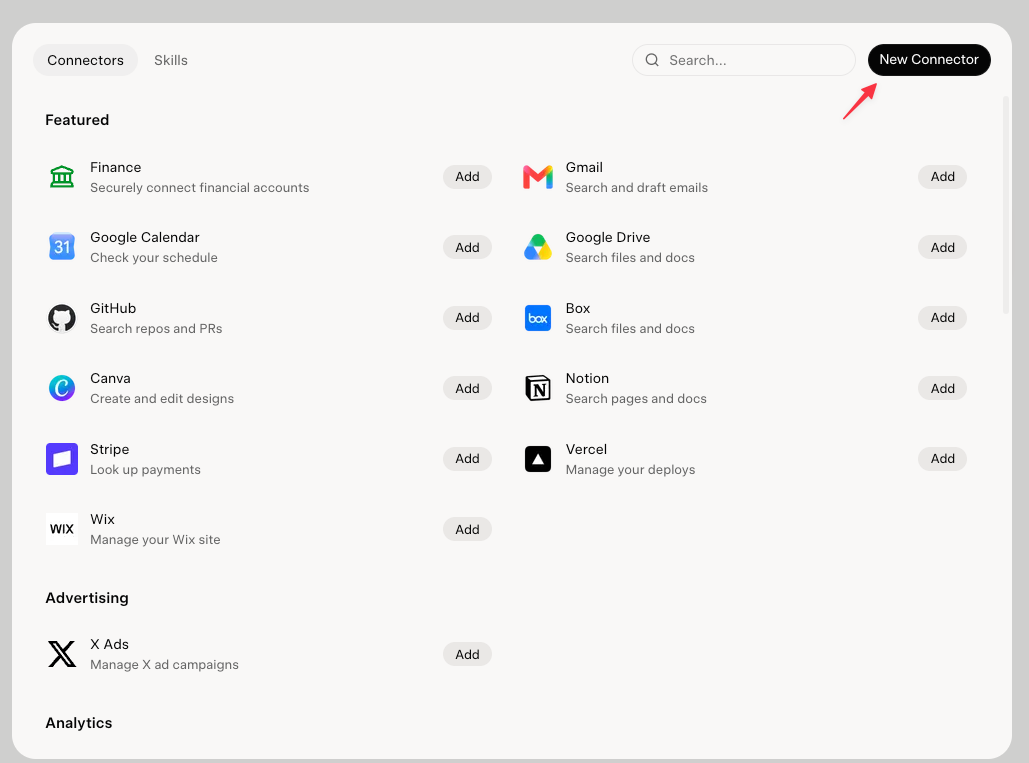
Paste the Banger URL
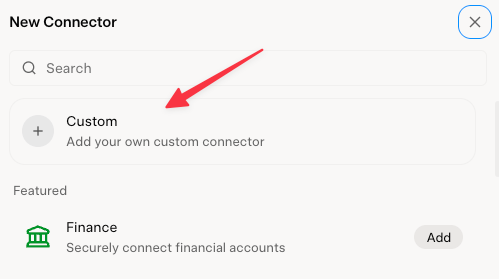
Choose Custom. Name it Banger and enter https://api.bangermail.com/mcp as the server URL, then add the connector.
Connect your Banger workspace
Sign in to Banger in the authorization window, choose your workspace, and authorize the connection. Return to your agent when it finishes.
Start with one simple request
Open a new conversation with Banger enabled. Ask it to list your mailboxes and summarize your active Journeys and recent Broadcasts. This checks the connection before you create anything.
Using Grok Bot?
Grok Bot installs connectors through Marketplace. A Banger marketplace listing has not been verified for this guide, so do not assume your Grok web connector carries over.
- Open Marketplace and search for Banger. If it is available, choose Add and complete authentication, then attach it to a task with @.
- If Banger is not listed, ask your Bot to open app.bangermail.com in its browser. Open Agent Computer and complete sign-in yourself.
- Ask the Bot to work in the Banger web app. This is the browser route, not a direct MCP connection.