
Mailboxes
Read, search, and reply
Folders, search, reading layouts, compose, reply, and the actions on a conversation.
In this guide 5 sections
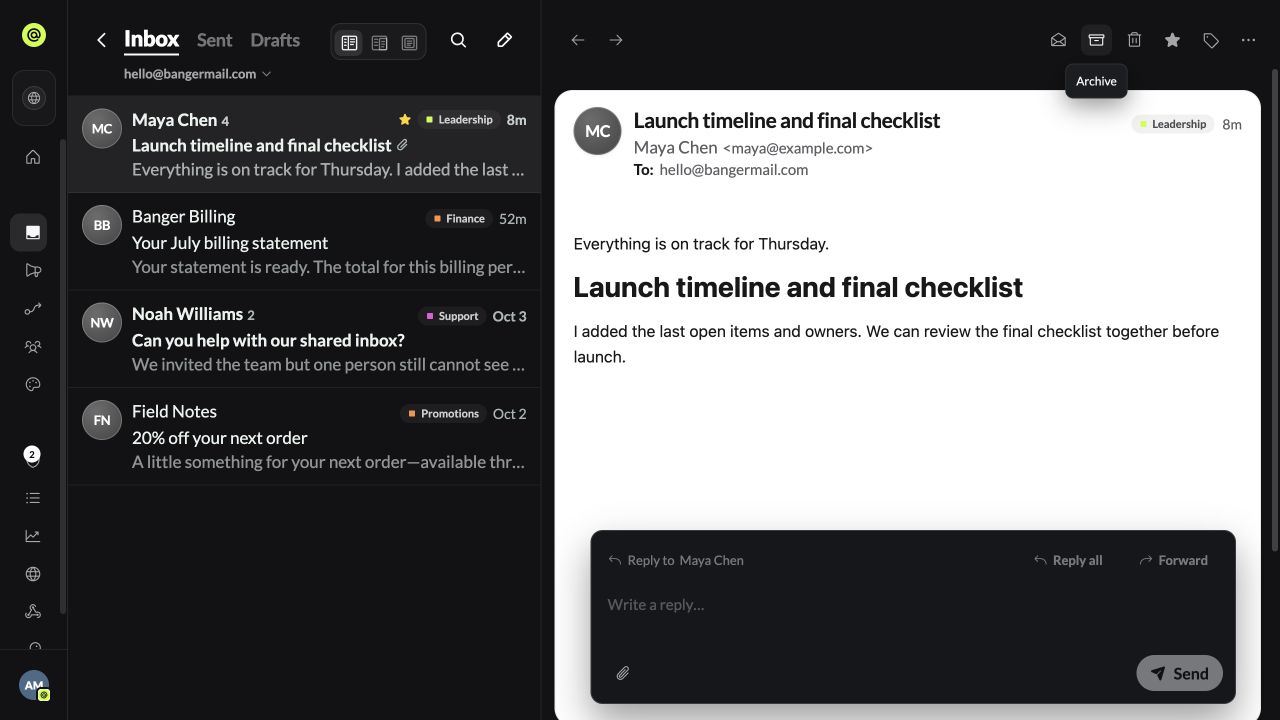
Open Mailboxes and pick a mailbox.
Find mail
- Inbox, Sent, and Drafts are tabs. Archive, Trash, Spam, and your labels are in the ⋯ menu.
- Search mail searches every mailbox at once.
- Switch mailbox from the header.
Reading layout
On desktop, choose Split view, Side panel, or Message window. Banger remembers your choice on that device.
Act on a conversation
Mark read or unread, Archive, Delete (moves to Trash), star, or add labels. More actions has Mark as spam and a log of anything Triage did to the conversation, with Undo.
Actions work on one conversation at a time.
Write and reply
- Compose: pick the From address, add To, Cc, Bcc, subject, and attachments. Drafts save automatically. ⌘↵ or Ctrl+↵ sends.
- Reply right below the message. Reply all and Forward open the full composer.
A Banger address can only email yourself and your other Banger addresses. Connect your domain to email anyone.
Try it with your AI
Summarize unread mail in support@ from today, draft replies to the three most urgent, and keep them as drafts for me to check.