
Journeys
Journey steps: waits, milestones, and checks
Wait, wait for a milestone, check progress, goals, and the ways people leave a Journey.
In this guide 7 sections
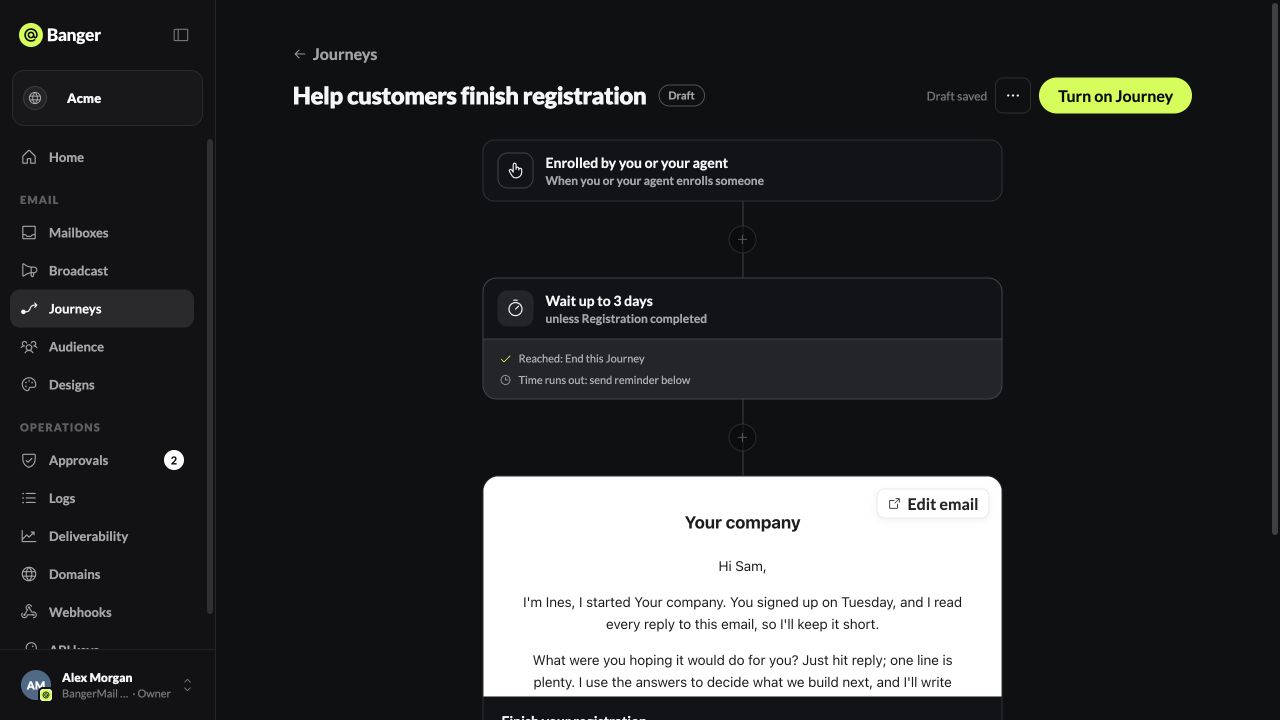
Add steps with + between existing steps.
Step types
| Step | What it does |
|---|---|
| Sends an email | |
| Wait | Pauses for 1–365 minutes, hours, or days |
| Wait for… | Waits up to a set time, unless the person reaches a milestone first |
| Check customer progress | People who match continue, everyone else leaves |
| Split here | Sends people down different paths to compare them. See A/B splits |
Wait for a milestone
Use it for reminders: “Wait up to 3 days, unless they’ve registered.” Choose what happens when they reach it: Skip reminder and continue, or End this Journey. A reminder email must come right after it.
Combine with next check turns a wait followed by a check into a single milestone.
Check customer progress
Compare a contact field: is, is not, contains, exists, or does not exist. Example: continue only if plan is not pro.
Goal
The last card sets what counts as success: a conversion event, a product event, or a reply. Reaching it ends the Journey for that person, and the goal rate shows on the Journey card.
How people leave
- They reach the goal.
- They reply, unsubscribe, or get suppressed.
- They don’t match a check.
- They finish the last step.
Timing rules
- Waits start when the person reaches the step.
- Your frequency and delivery window rules can delay emails further.
- Once anyone has entered, you can’t reorder steps or change how waits behave. Create a new draft for that.
Try it with your AI
In my Onboarding Journey, after the welcome email, wait up to 3 days unless the contact’s activated field is yes. If they activate, end the Journey; otherwise send the reminder email.