
Audience
Signup forms
Collect subscribers on your website with an inline form, popup, bar, slide-in, or hosted page, with double opt-in.
In this guide 5 sections
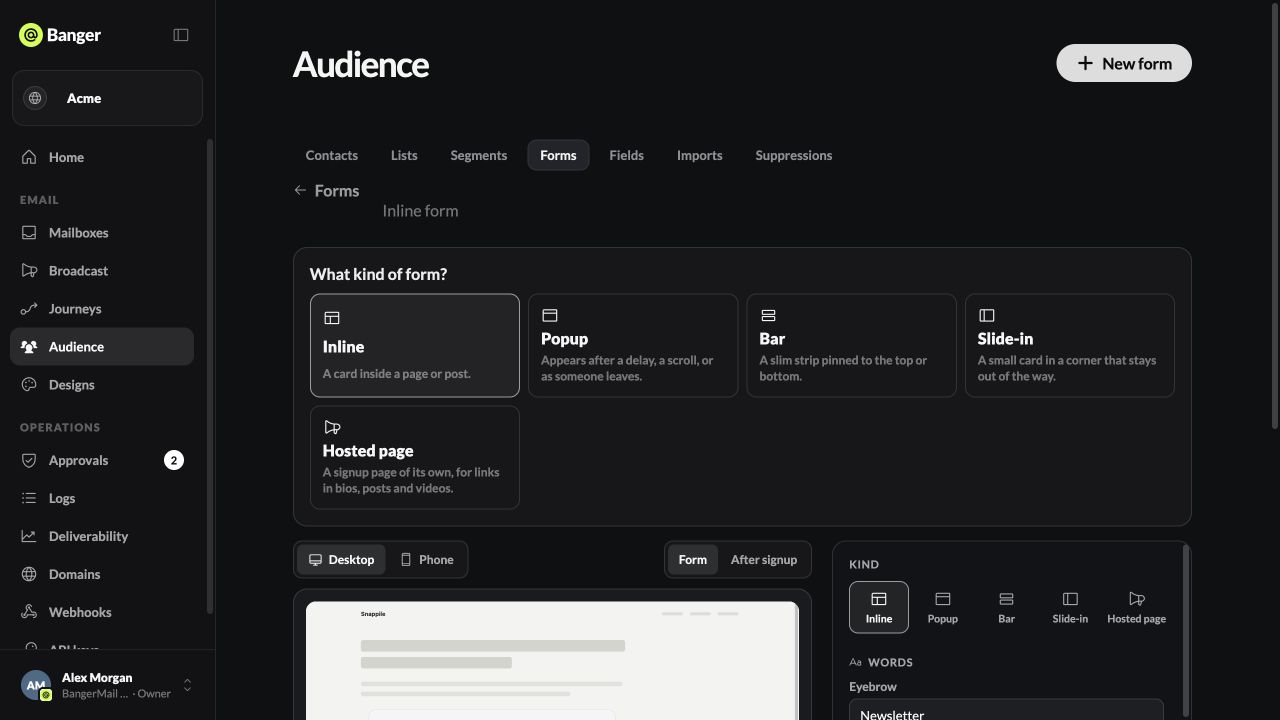
Open Audience › Forms and choose New form. Forms turn on once your domain is verified.
Choose a kind
- Inline: sits inside your page.
- Popup, Bar, Slide-in: appear over your page.
- Hosted page: a Banger page with its own link. No website needed.
Set it up
- Words: headline, supporting line, button, incentive, and fine print. Optionally ask for a first name, plus up to 6 questions (text, dropdown, or checkbox). Answers become contact fields.
- Style: colors, image, layout, and your logo. A joined count appears once 10 people have signed up.
- When it shows (popups, bars, slide-ins): after a delay, after scrolling, or on exit intent (desktop only). Set how many days before it shows again. Any element with
data-banger-form-openopens it on click. - Where people go: pick a list, or create one. Set the success message, or send people to a page.
- Confirmation: keep Ask people to confirm by email on (it’s the default). People join only after they click the link in the email.
- Language: each visitor’s language, or a fixed one. A fixed language is saved as the contact’s language.
- Choose Publish, then copy the embed code or the hosted page link.
Pause stops new signups. Archive form removes it.
What Banger records
Every signup stores its consent: the form, the page, the time, a hashed IP address, and whether the person confirmed by email.
Start a Journey from it
Use the form’s list as a Journey trigger to send a welcome email to everyone who joins.
Try it with your AI
Create a popup signup form for our newsletter that shows after 20 seconds, adds people to the Newsletter list, and uses double opt-in. Show me the preview before publishing.